ad
With Android Auto, driving becomes more connected, smarter, and much easier.
Android Auto is one of those tools that, once you start using it, feels almost impossible to drive without.
It transforms your car’s dashboard into a smart extension of your smartphone, bringing together navigation, communication, and entertainment all in one place.
All of this is designed to create a more practical, organized, and especially safe driving experience.
What Android Auto is and How it Works in your Car
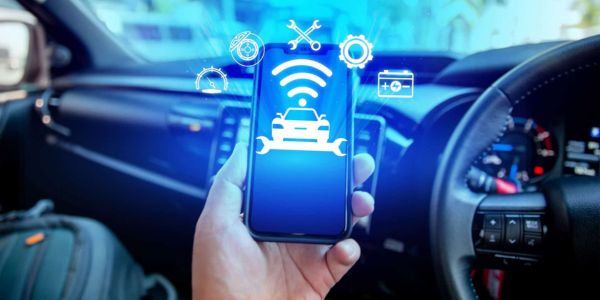
Android Auto works as a smart mirror of your smartphone on your car’s dashboard, adapting your apps into a simpler and safer interface.
When you connect your phone, either via USB cable or wirelessly, your car’s system displays an optimized version of your apps.
This interface is specifically designed to make usage easier while driving, with large buttons, a clean layout, and intuitive navigation.
Everything is structured in a way that minimizes distractions and makes information easy to access at a glance.
In addition, most actions can be performed using voice commands, which reduces the need for manual interaction with the screen.
👉 In practice, it feels like having a digital co-pilot that organizes everything while you focus on driving.
Smart Navigation: GPS and Real Time Routes
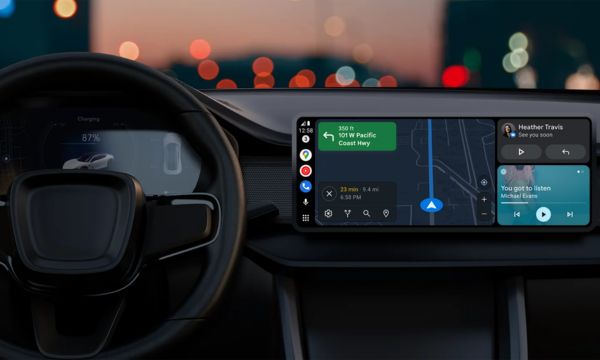
One of the strongest features of Android Auto is its real time smart navigation, powered by apps like Google Maps and Waze.
These apps provide constantly updated routes, taking into account traffic, accidents, roadblocks, and changes along your path.
You receive traffic alerts, hazard notifications, and estimated time of arrival (ETA) automatically, without needing to adjust anything manually.
This makes the driving experience smoother and helps you avoid unnecessary delays.
Another major advantage is voice controlled navigation.
With a simple command, you can start routes, change destinations, or search for nearby places like gas stations, restaurants, or parking areas.
Calls and Messages with Safety While Driving
Using your phone while driving is one of the biggest risks on the road, and Android Auto solves this problem effectively.
With it, you can make hands free calls and manage messages without touching your phone.
Incoming messages can be read out loud, and you can reply using only your voice, keeping your hands on the wheel and your eyes on the road.
This feature works seamlessly with popular apps like WhatsApp, Telegram, and Messenger, ensuring smooth communication without compromising your attention.
Another important feature is the Do Not Disturb mode while driving, which helps reduce distractions by limiting unnecessary notifications.
This way, you can stay focused on what really matters: driving safely and confidently.
Entertainment on the Road: Music and Podcasts
Driving becomes much more enjoyable with music, and Android Auto offers full integration with audio apps.
You can access songs, playlists, podcasts, and audiobooks directly from your car’s screen.
Apps like Spotify, YouTube Music, Deezer, and Amazon Music work seamlessly within the system.
With voice commands, you can change songs, start playlists, or resume a podcast without taking your hands off the wheel.
The system also allows you to pick up right where you left off, creating a continuous and personalized listening experience.
Safety and Voice Commands: Less Distraction, More Control
One of the biggest advantages of Android Auto is its integration with the Google Assistant, which centralizes almost all functions through voice commands.
With simple commands, you can navigate, send messages, make calls, and control your entertainment.
This significantly reduces the need to touch the screen or your phone, minimizing distractions and improving safety.
The interface itself also contributes to this, featuring a minimalist design and a focus on essential information, making it easy to read and interact with quickly.
The more you use voice commands, the more natural and intuitive the experience becomes, turning your driving routine into something smoother, safer, and more efficient.
Which Apps are Compatible with Android Auto?
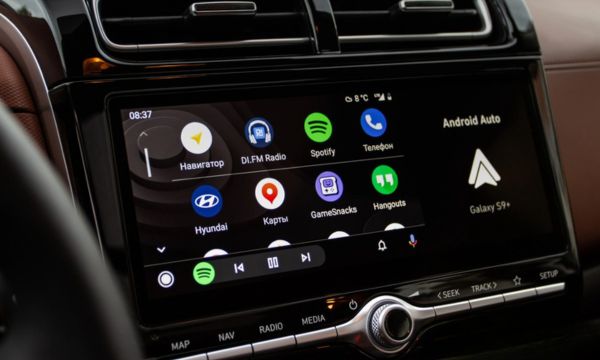
Android Auto supports a wide variety of compatible apps, all adapted for safe use while driving.
For navigation, you can use Google Maps and Waze with full integration.
For communication, apps like WhatsApp, Telegram, and Messenger allow you to send and receive messages easily.
And for entertainment, platforms like Spotify, YouTube Music, and Deezer provide access to a wide range of content.
Everything works in an integrated and simplified way, ensuring a smooth user experience.
In addition, new apps are constantly being added, expanding even further the possibilities of what you can do with Android Auto.

Tips and Tricks to Get the Most out of Android Auto
To get the most out of Android Auto, a few simple adjustments can completely transform your driving experience, making everything more practical, safe, and efficient in your daily routine.
With small changes, you can use the system much more intelligently, making better use of every feature available without adding complexity.
Here are some simple tips and tricks:
- Use voice commands frequently, as this reduces distractions and makes navigation faster and safer.
- Organize your most used apps on the home screen, making access easier during your trip.
- Enable only essential notifications, avoiding unnecessary interruptions while driving.
- Download music and content offline, ensuring entertainment even without internet access.
- Set frequent destinations, such as home and work, to quickly start routes.
- Use routes with multiple stops, making navigation more efficient for longer trips.
Over time, you naturally adapt Android Auto to your driving style, creating an experience that becomes more personalized, intuitive, and fluid.
Is it Worth Using Android Auto in everyday Life?
But after all, is it really worth using Android Auto on a daily basis? The answer is simple: yes, it is absolutely worth it.
The app proves to be a complete solution for those looking for more practicality and safety while driving, bringing together essential functions in one place.
It centralizes important tasks and reduces the need to use your phone directly, which already makes a significant difference in your routine.
With continuous use, the experience becomes increasingly natural and intuitive, almost automatic in your daily life, without requiring effort to access each feature.
In the end, you start driving with more peace of mind, control, and confidence on every trip, enjoying the journey more and reducing stress in traffic.