ad
With Samsung Health, you start to understand your body in a much simpler way.
If you’re starting to use Samsung Health, let me tell you something honestly: it can become part of your routine without you even noticing.
And the most interesting part is that it doesn’t complicate things, it organizes them!

You start using it out of curiosity… and before you know it, you’re already tracking sleep, steps, energy, and even daily habits.
Sleep Better: How Samsung Health Monitors your Sleep
One of the features I use the most in Samsung Health is sleep tracking.
Because it’s not just about “how many hours you slept”… it shows what your sleep was actually like.
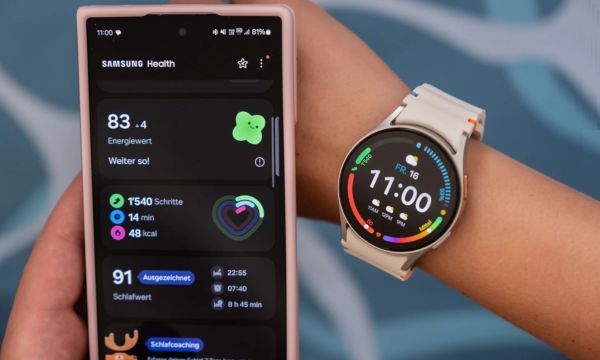
You can see total time, sleep stages (light, deep, and REM), as well as data like movement and heart rate during the night.
Another thing I found really interesting is the Sleep Coaching feature.
It analyzes your data over a few days and gives you practical suggestions to sleep better, in a simple way.
And there’s also that fun detail where it classifies you with a “sleep animal,” which makes everything lighter.
👉 And here’s something important: the app works on its own, but with a Samsung smartwatch, everything becomes automatic.
You sleep… and the next day everything is already there, without needing to do anything.
Activities and Workouts: Track Every Movement
Another thing that made me keep using Samsung Health was how it tracks your activities. It turns any movement into useful data.
You can see steps, distance, calories burned, and active time throughout the day.
And this builds a kind of awareness you didn’t even notice before.
The app also supports more than 100 types of exercises.
And when you use it with a smartwatch, it automatically detects activities like walking and running.
This is super practical, because you don’t have to manually start everything.
On top of that, you can see workout intensity and track your progress over time.
And when you start seeing results, it makes you want to keep going.
Nutrition and Hydration: Track What you Eat
I’ll admit that at first I didn’t pay much attention to this part… but later I realized how much of a difference it makes.
The app allows you to log your meals and track calories, proteins, carbohydrates, and fats.
This helps you understand what you’re consuming throughout the day.
You can also track your water intake, which seems simple but helps a lot in daily life.
Another interesting feature is that you can set nutrition goals. And the app connects this data with your physical activity and sleep.
In other words, it doesn’t just look at one area… it shows the complete picture.
Monitor your Heart Rate, Stress and Mindfulness
This is where the app starts to go beyond the basics!
Samsung Health lets you monitor your heart rate throughout the day, showing how your body reacts in different situations.
You can also track stress levels, which helps you notice when it’s time to slow down.
And the best part is that it doesn’t just show data… it also helps you!
The app offers guided breathing exercises, which are simple but very effective. This brings balance between body and mind.
If you use a more advanced smartwatch, you also get features like blood oxygen monitoring and even ECG. All right on your wrist!
How to Track your Weight and Fitness Goals
If you like tracking progress, you’ll really enjoy this part.
Samsung Health allows you to log your weight, BMI, and even body composition (with compatible devices).
You can set goals, like losing weight or gaining muscle, and track everything through charts.
What’s most interesting is seeing your progress over time. Because sometimes you don’t notice it day to day… but the data shows it.
Another strong point is that the app brings everything together: sleep, workouts, and nutrition.
So you can understand whether you’re actually progressing or just thinking you are.
And that gives you more clarity in your decisions.
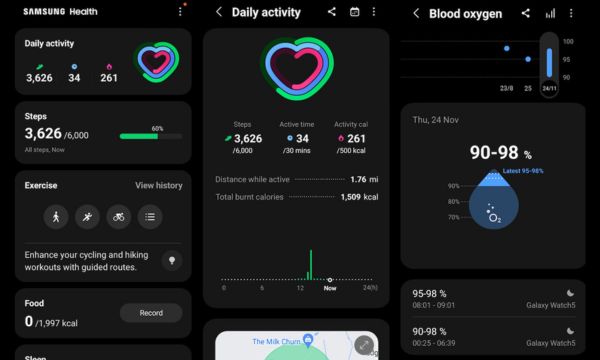
Reports and Insights: Turn Data into Healthy Habits
Over time, Samsung Health starts to show patterns. And for me, this was one of the most useful parts.
It generates weekly and monthly reports, showing how you’re progressing.
You can see if you’re sleeping better, if you’re more active, or if something needs adjustment.
And it doesn’t stop there! It also gives you personalized recommendations, based on your own data, which makes everything much more useful in daily life.
This helps a lot with maintaining consistency, because you don’t have to guess what to improve.
It’s not generic, it’s based on you, your routine, and your behavior.
Samsung Health and Wearables: Advanced Monitoring
Now here’s the part that really changes the game.
Samsung Health works on its own, yes.
But when you connect it with a Samsung smartwatch or other wearables, the experience becomes much more complete.
Everything starts to be tracked automatically. Sleep, activities, heart rate… everything is recorded without you needing to do anything.
And that makes a huge difference in daily life, because you don’t have to remember to log things, the app does it for you automatically and continuously.
On top of that, the data becomes much more accurate, which greatly improves the quality of analysis.
The more data you have, the better the insights and recommendations, since everything is based on your real patterns.
It’s like the app is learning from you over time and evolving along with your routine.
Conclusion
In the end, Samsung Health is not just an app… it becomes a dashboard of your routine.
It connects sleep, nutrition, physical activity, and well-being all in one place.
And when you start tracking this every day, you naturally begin making better decisions.
It’s not about doing everything perfectly. It’s about understanding what’s happening with you and adjusting little by little, respecting your pace.
Because in the end, it’s not the app that changes everything… it’s you, just with more clarity, more awareness, and making better decisions in your daily life.