ad
Have you ever thought about using FreeStyle to monitor your glucose directly from your phone?
What if you could monitor your glucose in a practical way and almost instantly? FreeStyle makes this possible using your smartphone.
Living with glucose fluctuations requires constant attention.
And when you rely only on isolated tests throughout the day, it can become exhausting.
With this system, monitoring stops being something done at separate moments and starts offering a continuous and strategic view of your routine.
In this article, you’ll understand how FreeStyle works in practice, how to connect it to the sensor, and most importantly, how to use this information to make more informed decisions.
How the FreeStyle App Can Transform your Routine
The biggest difference lies in how it changes the way you see glucose monitor.
Instead of checking only at specific times, you gain access to updated information throughout the day, bringing more clarity about what’s happening in your body.
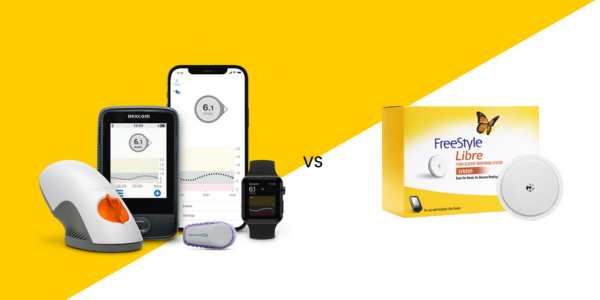
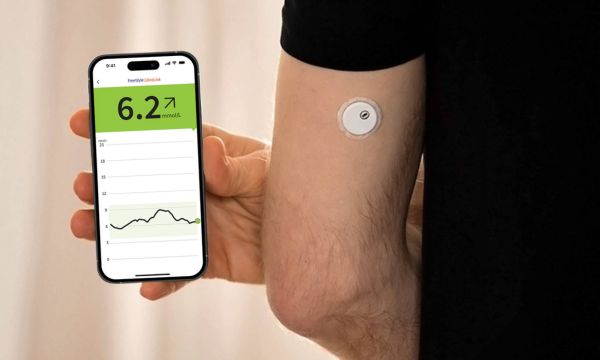
The system works together with a sensor applied to the back of the arm, responsible for measuring glucose in the interstitial fluid.
By bringing your phone with NFC enabled close to it, the reading appears on the screen within seconds, in a practical and discreet way.
With continuous use, monitoring stops being just an обязатель task and becomes a tool for greater autonomy and predictability in daily life.
Main Features that Truly Make a Difference
If there’s something that makes FreeStyle stand out, it’s the way it delivers information in a clear and useful way.
It’s not just about seeing your glucose value, it’s about understanding what that number means within your day.
Among the features that truly make a difference are:
- Quick scanning with your phone, without the need for extra devices
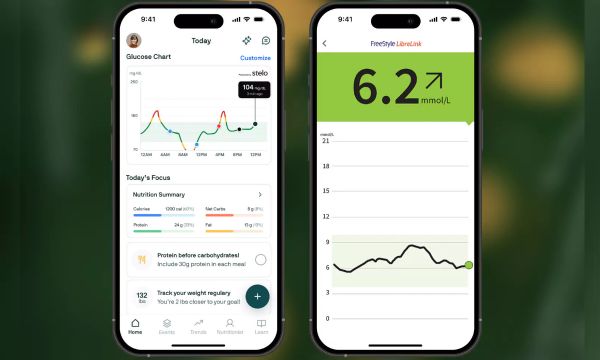
- Dynamic glucose visualization, with history accessible at any time
- Time in Range indicator, summarizing your daily monitor
- Field for personalized notes, connecting glucose with meals and routine
- Automatic integration with LibreView, making professional follow up easier
- Option for remote sharing through LibreLinkUp
The combination of convenience, speed, and organization helps glucose monitoring fit more naturally into your routine, without feeling complicated or overly technical.
How to Connect the FreeStyle App to the Glucose Sensor
Connecting the app to the sensor isn’t complicated, but a few details make all the difference to ensure everything works properly from the start.
Before beginning, make sure your phone is updated and has enough battery. After that, follow these steps:
- Follow the instructions to apply the sensor correctly on the back of your arm.
- Wait for the activation time indicated by the system.
- Enable NFC on your smartphone to allow communication with the sensor.
- Bring your phone close to the sensor to start the first reading.
It’s essential to remember that the sensor must be replaced every 14 days to maintain accuracy and reliability.
Monitor your Results and Understand your Trends
An isolated reading doesn’t tell the whole story. What really makes a difference is observing the direction of movement.
The app displays trend arrows indicating whether glucose is rising, falling, or stable. This allows for faster and more informed decisions.
In addition, reports show daily and weekly patterns, helping you understand how meals, exercise, and routine impact your results.
With continuous use of FreeStyle, you develop greater awareness of your own metabolism.
This understanding builds confidence and reduces anxiety related to glucose fluctuations.
Advantages of the FreeStyle App for People Living with Diabetes
For those living with diabetes, FreeStyle offers practical and emotional benefits.
Among the main advantages are:
- Continuous monitoring, allowing you to follow fluctuations throughout the day.
- Greater predictability, helping identify patterns and anticipate possible changes.
- Clear reports for medical appointments, making conversations with your doctor more objective.
- The possibility of sharing with caregivers, providing more support and security in daily monitoring.
Parents of children with diabetes, for example, find extra peace of mind through remote sharing.
FreeStyle does not replace medical follow up, but it strengthens daily care based on consistent and organized data.
Common Mistakes When Using FreeStyle (and How to Avoid Them)
One common mistake is using FreeStyle just to “check the number” instead of observing patterns throughout the day.
The isolated value matters, but repeated behavior is what truly guides decisions.
Another issue is not recording meals, exercise, or stressful situations.
Without these strategic notes, you miss the chance to understand what’s really influencing your glucose.
It’s also common to rely only on physical sensations and forget to check the trend before acting.
Sometimes you feel fine, but the arrow shows a rapid drop that requires attention.
Finally, many people don’t review Time in Range weekly.
This indicator shows the overall picture of monitor and helps adjust small details before they become bigger problems.
How to Download and Start Using the App
Getting started with FreeStyle is straightforward.
First, check if your smartphone is NFC compatible. In general, iPhone 7 or later and Android devices 5.0 or higher with NFC enabled work properly.
Then:
- Download the app from the App Store or Google Play and make sure it’s the official version before installing.
- Create your account by entering your basic information and confirm registration to ensure secure data storage.
- Enable NFC in your phone settings to allow communication with the sensor.
- Scan the sensor by bringing your smartphone close to the back of your arm to start continuous monitoring and view your first readings.
Over time, using FreeStyle naturally becomes part of your routine.
Readings become quick, simple, and almost automatic. And when technology makes care easier, monitoring feels lighter.
Conclusion
Definitely, FreeStyle changes the way you monitor glucose daily.
It doesn’t just show numbers, it helps you understand what’s happening and act with more confidence.
If you live with diabetes or prediabetes, using the full potential of FreeStyle can be an important step toward achieving greater autonomy, balance, and quality of life.
Keep following our content to discover other solutions that make health care easier.
Sometimes small changes in your routine make a huge difference in your well being.